
Approval Prompt
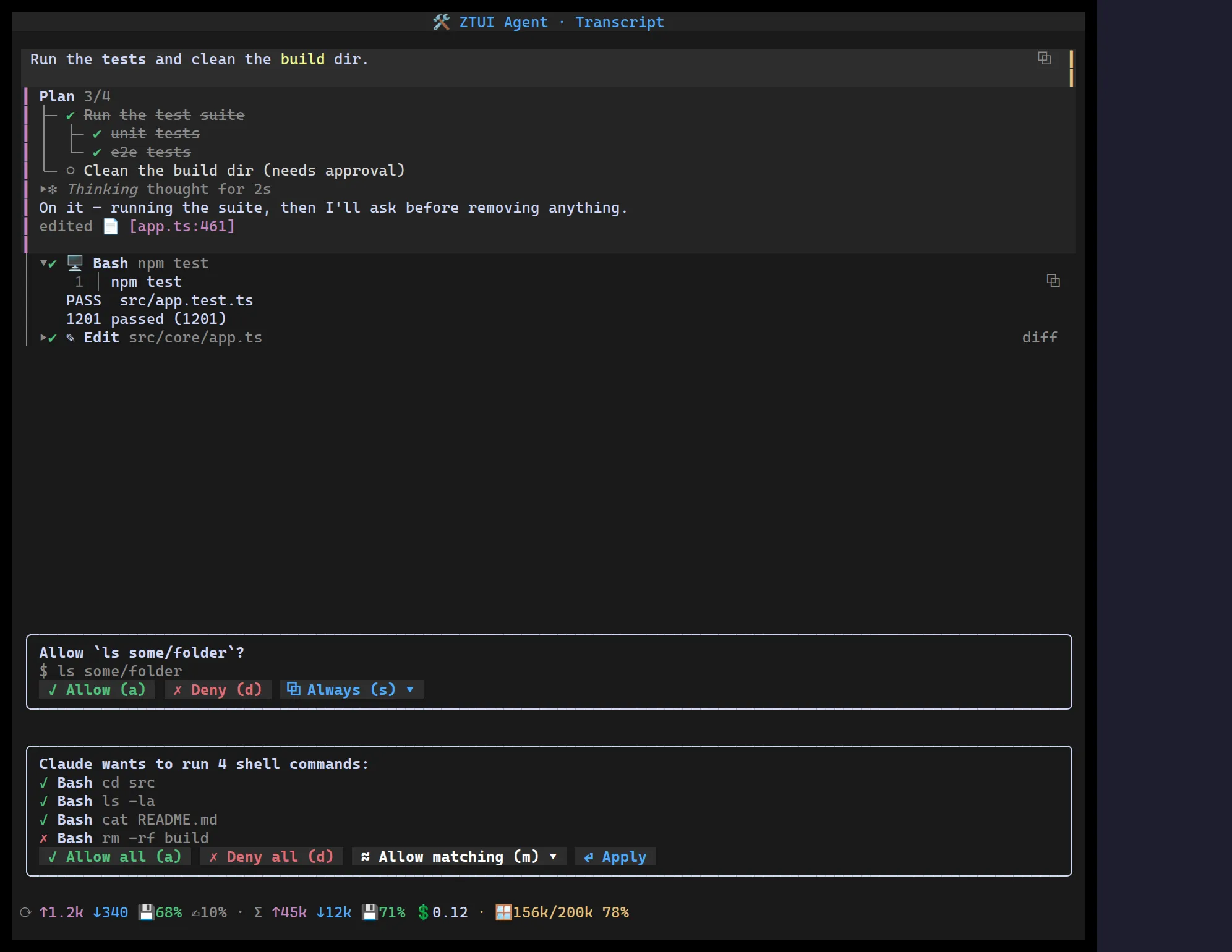
<ApprovalPrompt> is the permission gate an agent shows before running a tool.
It comes in two shapes — a single prompt with customizable action buttons,
and a batch prompt that resolves several tool calls at once — both built to
pack tight (bordered, no wasted rows). The action buttons are a
ButtonGroup: the row is a single Tab stop and
the arrow keys move between Allow / Deny / Always. Single-key shortcuts and
Esc still fire while focus is anywhere in the prompt; an action with sub-actions
opens an inline ▾ dropdown, and an input action opens a free-text
custom-pattern field.
By default the gate grabs focus when it appears (autoFocus, on by default —
a permission gate is modal), so the keyboard is ready immediately: arrow between
the actions and press Enter, no Tabbing in. Set autoFocus={false} to leave focus
where it was — e.g. when several gates are on screen at once.
Single prompt
Section titled “Single prompt”import { ApprovalPrompt } from "@huyz0/ztui/react";
<ApprovalPrompt prompt="Allow `ls some/folder`?" actions={[ { id: "allow", label: "Allow", icon: "✓", key: "a", tone: "success" }, { id: "deny", label: "Deny", icon: "✗", key: "d", tone: "danger" }, { id: "always", label: "Always", icon: "⧉", key: "s", tone: "primary", menu: [ { id: "exact", label: "this exact command" }, { id: "all-ls", label: "all `ls` commands" }, { id: "custom", label: "custom pattern…", input: { placeholder: "e.g. ls some/*" } }, ], }, ]} onAction={(id, value) => grant(value ? `${id}:${value}` : id)}/>;Each ApprovalAction is { id, label, icon?, key?, tone?, menu?, input? }. A
menu opens an inline ▾ dropdown; an input opens an inline field (Enter
submits its value, Escape cancels). Tones map to theme colours
(default/primary/success/danger). Esc denies.
Batch prompt
Section titled “Batch prompt”Pass calls and onResolve to gate several tool calls together: a clickable
per-row ✓/✗ toggle list plus derived Allow all / Deny all / Allow
matching ▾ / Apply actions.
<ApprovalPrompt prompt="Claude wants to run 4 shell commands:" calls={[ { id: "1", name: "Bash", args: "cd src", matches: ["Bash", "cd", "read-only"] }, { id: "2", name: "Bash", args: "ls -la", matches: ["Bash", "ls", "read-only"] }, { id: "4", name: "Bash", args: "rm -rf build", defaultDecision: "deny", matches: ["Bash", "rm", "rm -rf *"] }, ]} onMatch={(pattern) => persistStandingRule(pattern)} onResolve={(decisions) => run(decisions)}/>;Allow-matching is pattern-based and shell-agnostic. Each call carries a
host-derived matches: string[] (e.g. tool name + command head + a glob + a
semantic group). The dropdown offers the union of those patterns plus a typed
custom glob; picking one flips every matching call to allow and fires
onMatch(pattern) so the host can persist a standing rule. The library never
parses shell — your host supplies the patterns.